Stem Separation
Released: April 21, 2026
Edition: Live 12.3
Stem separation is the process of splitting a mixed audio track (e.g., a song) into individual “stems” such as vocals, drums, bass, and others. Parts which are not identified as being vocals drums or bass, will be categorized as "other". With the new version of Live Suite, this is now possible to run locally.
How to Use
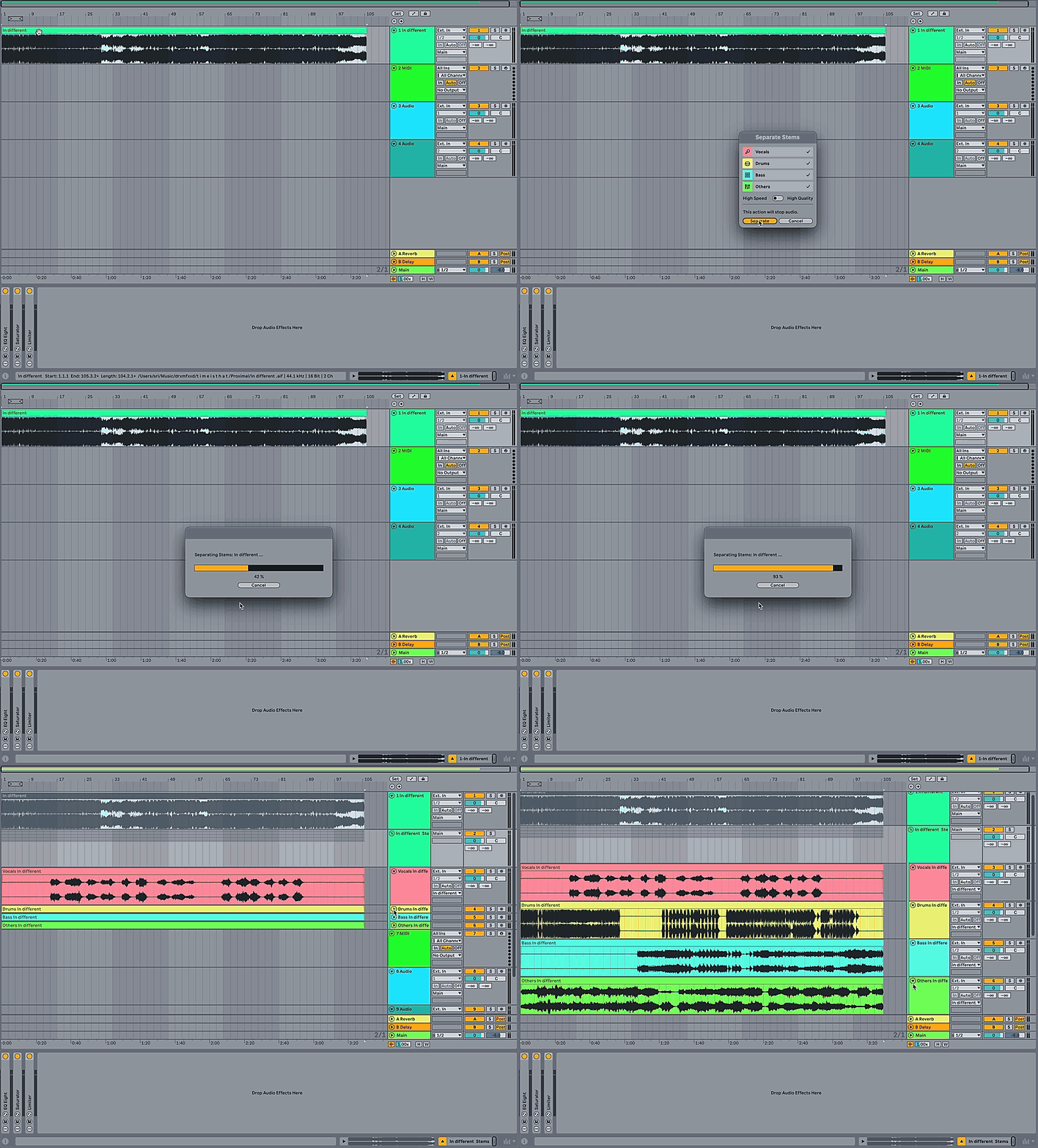
The feature can be accessed using audio files from the browser or by choosing clips from the Session or Arrangement View.
- Right-click a sample in the browser or a clip in the Session or Arrangement view
- Select Separate Stems to New Audio Tracks
- A pop-up menu will appear — select either High Quality or High Speed output
While a high-speed output will yield results much faster, the quality will differ from the high-quality output.
High Speed and High Quality
The difference between the two modes is determined by the number of separation passes performed.
| Mode | Passes | Result |
|---|---|---|
| High Speed | Single pass | Faster output, lower separation accuracy |
| High Quality | Individual pass per stem | Slower output, higher separation accuracy |
When to Use It
Results vary depending on source material, mix quality, and genre. Stem separation works well when you need to:
- Create remixes or instrumentals
- Apply processing such as EQ or compression to an isolated part of the mix
- Remove or isolate vocals
- Improve transcription accuracy
Performance
On computers running macOS 26.4 and above, stem separation can now use the GPU instead of the CPU, which significantly speeds up processing time.
Supported Formats
| Status | Formats |
|---|---|
| Supported | WAV, AIFF, AIFF-C, FLAC, OGG Vorbis, MP3, M4A |
| Not supported | Multi-channel files, ADM — convert to a supported format first |
File Naming
Separated stems are named automatically using the following convention:
| Stem | Name |
|---|---|
| Vocals | Vocals "track name" |
| Drums | Drums "track name" |
| Bass | Bass "track name" |
| Others | Others "track name" |
FAQ
Does this remove vocals perfectly?
No. Stem separation is best-effort. Results vary by genre, mix quality, and source material.
Can I separate more than four stems?
No. The current version outputs four stems only.
Changelog
| Version | Change |
|---|---|
| 12.3.7 | Stem separation can now use the GPU on macOS 26.4 and above |
| 12.3 | First release of Stem Separation |